
Waypoint Time-Lapse Videos: Show Site Progress Stakeholders Love
Marketing Asset for Industrial Teams
SBN MEDIA TEAM
6/18/20266 min read
What Is Waypoint in Time Lapse Videos?
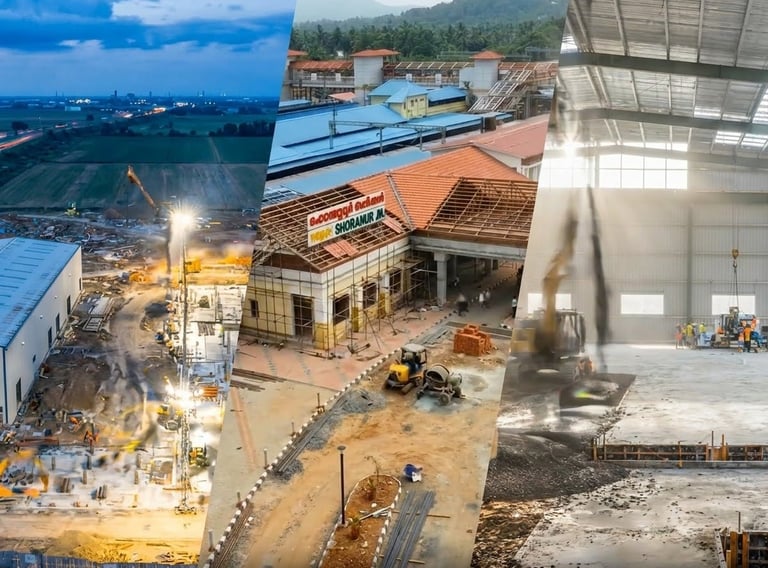
A waypoint is a set of 3D geographic coordinates (Latitude, Longitude, and Altitude) that are programmed into a drone's flight control system. In construction time lapse videos and hyperlapse videos, waypoints provide precise location in 3D space along with the exact camera angle. Whenever the drone returns for the next shoot, it flies itself to that saved point automatically.
When you string multiple waypoints together, you create a Wayline or Waypoint Mission.
Explore SBN Media’s Waypoint Timelapse Video Services
Difference Between Fixed Camera View and Planned Waypoint Sequence
If you recognize the need to visually document your project, the next critical decision is the methodology. Historically, construction timelapse meant installing a rugged, solar-powered camera onto a fixed vantage point. The system takes photos at set intervals over months or years, and the final edit is compiled at the very end of the project.
While this method provides a continuous view, it comes with significant operational realities on remote Indian sites. Fully-managed systems carry recurring monthly costs, while self-managed setups require significant upfront hardware investments. More importantly, unattended equipment is vulnerable to theft and vandalism. Lenses suffer from fouling due to dust, soot, and bird droppings , and solar or 4G network failures are common. Furthermore, because the edit relies on the continuous capture of the entire timeline, there is often no interim deliverable available for quarterly board reviews.

A fixed camera timelapse compresses time from one viewpoint. You can use it when you want to show site progress, installation stages, traffic flow, factory activity, or construction development clearly and consistently.
On the other hand, a planned waypoint time lapse compresses time besides moving the camera through space and is best for achieving a more cinematic result. Examples include flying toward a building, orbiting a site, revealing scale, or repeating the same route over multiple dates. This is closer to motion-control timelapse, where controlled movement adds depth and visual energy compared with a static timelapse.
Where Waypoint Time Lapse Videos Work Best in Industrial Projects?
Waypoint time lapse videos are especially useful in industrial projects where progress happens in clear stages and every milestone matters. The waypoint hyperlapse or time lapse approach helps marketing teams capture the right angles at the right moments. The visual proof supports project visibility, stakeholder communication, and business development.
Plant Builds
For new factory builds in India, waypoint time lapse is one of the best ways to document the full journey from foundation to commissioning. A single camera angle shows the same half-built structure for weeks. Waypoint planning captures key stages such as structural steel erection, roof closure, machinery installation, and trial runs. This gives your investors and stakeholders a clear view of execution capability and on-ground progress.
Infrastructure Projects
India’s infrastructure pipeline is massive, with ongoing work across highways, rail, metro systems, ports, and logistics corridors under national programs such as PM GatiShakti and other large public works. On these sites, one camera angle cannot properly show scale. A planned waypoint sequence captures approach roads, structure elevation, deck work, and finished connectivity for a more complete visual proof of progress.
Equipment installation
Waypoint time lapse videos are also valuable when industrial groups install heavy machinery, production lines, or plant utilities. These projects involve several important moments covering delivery, unloading, positioning, alignment, and commissioning. When manufacturers capture each stage in an infrastructure time lapse, it shows operational readiness and technical capability. Prospective buyers get a view of your disciplined project execution.
Expansion work
Expansion projects are common across Indian industrial clusters like Uttar Pradesh, Gujarat, Tamil Nadu, and Maharashtra. Because companies add capacity without shutting down the existing facility, Waypoints help document both the old and new sections of the site so the audience can clearly see growth. This creates strong material for website case studies, LinkedIn updates, and capability decks that prove the company is scaling in a controlled way.
How to Create Waypoints for Time Lapse and Hyperlapse Videos
To create time lapse and hyperlapse videos of industrial or manufacturing progress, you need DJI and Autel drones as they have waypoints as one of the automated flight patterns. Then, set the waypoints where the drone should fly, the camera headings, and angles. Save waypoint flights and repeat them any number of times.
Here’s a general process to create a waypoint drone mission for time lapse videos:
1. Scout the location
Before setting waypoints, find a safe route. Check for the following:
Start and end position
Obstacles such as cranes, buildings, poles, trees, or cables
Sun direction
Wind exposure
Safe takeoff and landing area
Whether the route will still be safe later in the project
2. Enter the Time Lapse Mode
In the drone’s Photo/Video menu, choose the Time Lapse mode. If using the DJI Fly app, choose this mode after tapping the camera mode icon.
3. Set Your First Waypoint
Place the camera or drone at the starting position and save it as Waypoint 1. This first point sets up the opening frame of the timelapse.
At this point, record altitude, camera angle, gimbal pitch, lens direction, framing, and focus and exposure settings.
4. Add the Next Waypoints
Move to the next position and save it as Waypoint 2. Continue adding points until the full route is built. Each waypoint should have a clear visual purpose.
5. Define Camera Actions at Each Waypoint
For each waypoint, set what the camera should do. Photo interval is one of the most important settings for time lapse videos.
Common options for camera actions include:
Take photo
Start recording
Stop recording
Adjust gimbal pitch
Turn toward a point of interest
6. Set Interval and Duration
Choose how often the camera captures an image. The shorter the interval, the smoother the final video will look. The longer the interval, the more dramatic the time jump will feel.
7. Lock Manual Camera Settings
Use manual settings where possible to avoid flicker between frames. These settings include:
Manual exposure
Manual white balance
Manual focus
Fixed ISO
Fixed shutter speed
Fixed aperture, if available
9. Save the Waypoint Route
Save the mission or route so it can be repeated later. It is useful for long-duration timelapse videos showing transitions like day to night or seasonal change.
End-to-End Time Lapse Services from SBN Media
At SBN Media, we create cinematic timelapse for industrial projects by documenting your site at regular intervals. Our team manages the entire time-lapse pipeline, from initial site survey and waypoint planning to ready-to-publish videos tailored for industrial marketing teams.
We use Waypoints to design strategic camera positions and movements so your project is captured from the most impactful angles across key milestones, not just from a single static view. Once the footage is captured, SBN Media’s post-production team steps in with professional video editing, color correction, and stabilization to turn raw frames into a smooth, high-impact narrative suitable for websites, investor decks, and social media. You can layer this with voiceovers, multilingual dubbing, and custom sound design or music, so the same core time-lapse asset works for different regions, stakeholder groups, and campaign types.
If your project is approaching groundbreaking, or is already mid-construction, get in touch with SBN Media to explore how best to document the construction progress.
In sectors like manufacturing, construction, and infrastructure, a well-planned waypoint time lapse video gives stakeholders a clear visual record of how a project evolves over time, from the first stage of work to final completion.
Unlike static site photos, waypoint-based site progress videos capture the construction progress precisely and with cinematic clarity. This makes it useful for marketing teams that want to document real project milestones and show operational strength to clients, investors, and partners. In this post, we explain what an industrial time lapse video is and how drone waypoint missions are used to create videos that perfectly communicate a project’s progress.
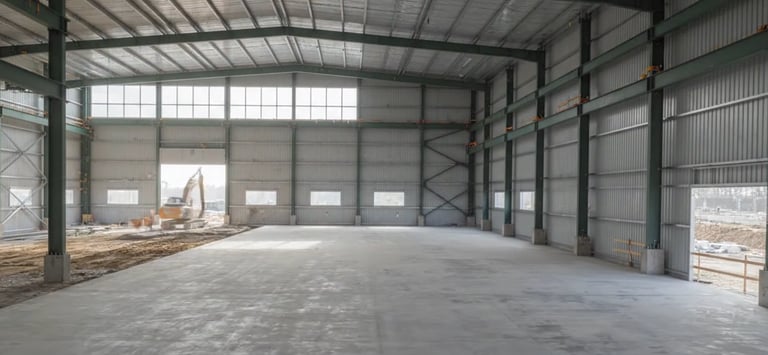
Interior of a steel-structure industrial warehouse under construction, captured as part of a Waypoint time lapse video project by SBN Media.
On the other hand, a planned waypoint-led time lapse video utilizes a visit-based approach. In this model, no equipment is left on the site. Instead, a specialized ground and drone crew visits your facility on a monthly basis to record the site from 20-25 pre-selected locations and angles. Using advanced hardware like the DJI Mavic 3E or Matrice 350 RTK, the pilot executes a pre-saved, georeferenced waypoint mission. The drone's software automatically records and replays the exact flight altitude, nose direction, and gimbal pitch angle for every single visit. Ground-level shots are anchored seamlessly against GPS-tagged marker pegs.
The table below summarizes the key differences between a fixed camera view for time lapse and a waypoint sequence:
© Sixteen By NIne Media 2024. All rights reserved.
SBN Media | AI Video Studio & Corporate Film Production – Mumbai, India
Specialized in AI-powered corporate videos, brand films, product ads, and multilingual content